DownloadCurrent v1.0.120

Impulse Anvil VST3 ZIP.

Download the Windows VST3 folder bundle, extract it, copy the complete Impulse Anvil.vst3 folder into the VST3 directory, then rescan your DAW.

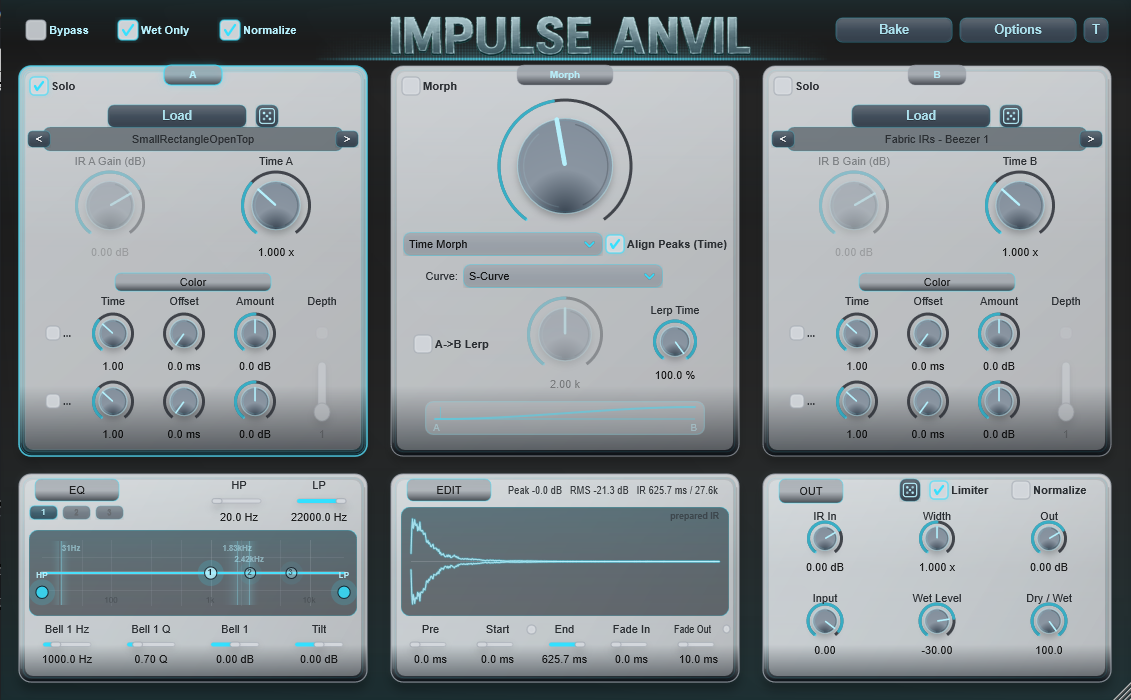
Impulse Anvil plugin interface
Setup videos

Install and activate Impulse Anvil.

Watch the short setup walkthroughs directly here before opening your DAW.

Installation

Download, extract and copy the complete VST3 folder to the Windows VST3 directory.

License activation

Paste your license key into the plugin and unlock the full version after purchase.

Install guide

Quick Setup — Copy/Paste

Open both folders, then copy the full Impulse Anvil.vst3 folder into your system VST3 folder.
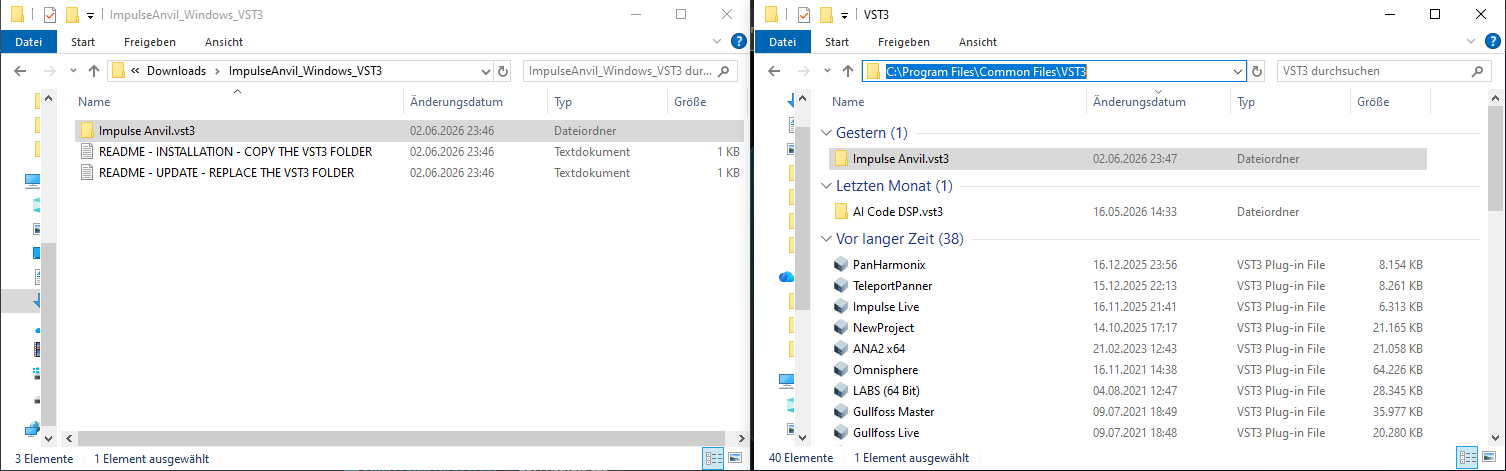
Impulse Anvil installation guide showing the downloaded VST3 folder and the system VST3 folder side by side

Image guide: left = extracted download folder, right = C:Program FilesCommon FilesVST3.

1

Extract

Unzip ImpulseAnvil_Windows_VST3.zip. Keep the VST3 bundle structure intact.

2

Copy

Copy the complete Impulse Anvil.vst3 folder to C:\Program Files\Common Files\VST3.

3

Rescan

Restart or rescan your DAW. The 126 handmade IR library is bundled inside the plugin folder.

Changelog

Release notes.

Open a version to see what changed. The newest public build is listed first.

v1.0.120 — JUCE 8 Maintenance Build

This maintenance release refreshes the Windows commercial build after migration to JUCE 8.0.13.

Updated

  • Rebuilt the Windows 64-bit VST3 with JUCE 8.0.13.
  • Refreshed the commercial release package and build process.
  • Corrected the license activation dialog layout after the framework migration.

Compatibility

  • No intentional changes were made to the DSP workflow, parameter IDs, project-state format, factory IR library, license entitlement or demo restrictions.
  • Existing projects and sessions should remain compatible.
  • Replace the complete existing Impulse Anvil.vst3 folder when updating.
v1.0.120 — JUCE 8 Maintenance Build

Current release

This maintenance release refreshes the Windows commercial build after migration to JUCE 8.0.13.

Updated

  • Rebuilt the Windows 64-bit VST3 with JUCE 8.0.13.
  • Updated the bundled license notices for the current release toolchain.
  • Corrected the license activation dialog layout after the JUCE migration.

Compatibility

  • No intentional changes were made to the DSP workflow, parameter IDs, project-state format, factory IR library, license entitlement or demo restrictions.
  • Windows 10/11, 64-bit VST3.
  • Replace the complete existing Impulse Anvil.vst3 folder when updating.
v1.0.119 — Workflow, Spatial Morph and Randomization Update

This update focuses on cleaner workflow, improved A/B slot handling, new spatial morph behavior, better loudness control, and a more coherent randomization/layout experience.

New Spatial Morph Modes

  • Added Stereo Slot Swap, a spatial morph field where the left channel moves from Slot A to Slot B while the right channel moves from Slot B to Slot A.
  • Added Mid/Side Boundary, keeping Slot A in the center/mid field while introducing Slot B into the side/outside field.
  • Both new Morph Modes are supported in normal Morph preview, A-to-B Lerp preview, project restore, and Lerp Bake/export.

Improved Drag & Drop Slot Routing

  • Dropping a WAV file onto the A panel now reliably loads Slot A.
  • Dropping a WAV file onto the B panel now reliably loads Slot B.
  • The empty-slot fallback behavior outside the A/B panels is preserved.

Loudness & Normalize Workflow Cleanup

  • Slot A and Slot B now have their own Normalize controls.
  • Old sessions that used the previous global Normalize setting remain compatible and migrate safely to the new A/B Normalize setup.
  • Slot Gain remains useful when Normalize is enabled, making A/B compensation easier after normalization.
  • Output/Post Normalize now defaults to ON, and the visible Post Limiter clearly controls final output limiting.
  • Random, load, and reset workflows no longer unexpectedly reset Wet Level to -30 dB, except for factory startup defaults.

Randomization Workflow Improvements

  • A/B full-slot random buttons randomize the full slot IR selection and related full-slot behavior.
  • A/B Color-header random buttons randomize the current IR's Color controls only, keeping the loaded IR in place.
  • Morph Random is available directly in the Morph card and randomizes Morph-related controls only.
  • EQ and EDIT now have their own local random buttons.
  • A/B Random resets Slot Gain to 0 dB and no longer randomizes gain above unity.

Layout & Usability Polish

  • Init/Reset Controls has been moved into the Options menu.
  • Clicking the A, B, or Morph panel background now selects that mode.
  • Moving a Color voice knob automatically enables that Color voice, so the change is immediately audible.
  • Morph Mode and Curve dropdowns are now centered in the Morph panel.
  • K and Lerp Time now use compact horizontal controls above the curve display.
  • Align Peaks has been renamed to Align with a clearer tooltip.
  • Post random tooltip now clarifies that it affects EQ, EDIT, and OUT.

Fixes

  • Fixed A/B WAV drag-and-drop target detection.
  • Fixed EDIT double-click reset behavior when linked Start/End or reverse Fade Out are active.
  • Fixed Morph Random build handling from the previous internal build step.

Existing projects and sessions remain compatible.

v1.0.113 — Texture Depth Bug Fix

Small maintenance update for Texture Depth.

  • Fixed a "Texture" bug, previously introducing the wrong IR when tweaking parameters.
v1.0.112 — Prepared IR length policy

This update makes prepared IR length handling more predictable across preview, editing, statistics and baking.

  • Preserves quiet reverb tails that belong to the loaded or processed IR instead of trimming them unexpectedly.
  • Uses the same prepared-IR length policy for convolver preview, A/B slot stats, Bake and A→B Lerp export.
  • Keeps a hard 30-second safety cap for generated Color, Texture, Morph and Lerp results.
  • Prevents mismatches between long Color/Texture stats, shorter Edit ranges and convolver safety kernels.
  • Color, Texture, Morph, Lerp, project restore, Normalize and Limiter behavior are unchanged.
v1.0.110 — Release polish and safety
  • Improved C1/C2 Color switch rendering so the labels stay readable in tight rows.
  • A/B prepared IR stats are now laid out directly in the active manual A/B panels.
  • Improved Lerp curve display readability in the default theme.
  • Theme randomizer tooltip now shows the current theme name.
  • Normalize tooltips now warn clearly that quiet IRs can become much louder.
  • A/B/Morph switching now uses a safer unity-sum crossfade to reduce brief correlated level boosts.
  • Spectral, BandSwap and ZigZag Lerp snapshots are normalized when Normalize is enabled, reducing weak or silent middle sections.
v1.0.109 — Slot stats and default-theme polish
  • Added per-slot prepared IR stats for A and B: Peak, RMS and IR length.
  • Slot stats follow the prepared slot after Time, Gain, Color, Texture Depth and Normalize.
  • Color voice switches now draw as compact C1/C2 controls instead of being shortened to ellipses.
  • The factory Anvil Blue theme was slightly calmed for a cleaner first-run look.
  • Stats update from the editor side with throttling; no audio-thread work was added.
v1.0.108 — Color label polish
  • Color enable switches now display C1 and C2 visibly.
  • Added clearer C1/C2 tooltips for A and B Color voices.
  • No DSP, Morph/Lerp, Color/Texture, backend or licensing behavior changed.
v1.0.107 — Build safety and Lerp build indicator
  • Added safer cancellation for heavy Morph/Lerp preview jobs.
  • Closing the editor, deleting the plugin, closing a project or quitting the DAW can now cancel pending Morph/Lerp work cleanly.
  • Background preview, convolver and Color jobs now check shutdown state before publishing results.
  • Added a subtle masthead build glow while heavy Morph/Lerp preview work is running.
  • The old IR keeps playing until the new preview IR is ready.
v1.0.105 — Mode-aware A→B Lerp
  • A→B Lerp Preview now uses the selected Morph Mode.
  • Time Morph Lerp remains the default compatibility path.
  • Spectral, BandSwap and ZigZag Lerp are built from fixed intermediate snapshots for more mode-specific movement.
  • Preview, DAW project restore and Lerp export now share the same processor-side Lerp build path.
  • The unified Bake button still exports the prepared IR exactly as heard.
v1.0.104 — DAW project restore fix
  • DAW project save/load restore now rebuilds the active internal preview IR from the processor side.
  • Saved A/B IR paths and A Only, B Only, Morph and Lerp state are restored without requiring the plugin editor window to be opened.
  • Morph restore supports Time, Spectral, BandSwap and ZigZag modes.
  • Baked/prepared IR audio is not stored inside the DAW project; the plugin rebuilds it from saved state.
v1.0.103 — Editor state persistence
  • Morph Mode, Align Peaks, Curve Type and Curve K now persist through the plugin state.
  • Closing and reopening the plugin editor no longer resets these controls to default values.
  • Texture Depth recursion is safer when only one Color voice is enabled.
  • Texture Depth and IR Gain tooltips were clarified.
v1.0.102 — Preview identity and Align Peaks fix
  • Prevents stale preview jobs from overwriting the currently processed IR.
  • Morph Mode changes now rebuild more deterministically, especially for spectral modes.
  • Strengthened preview identity handling so different spectral results are less likely to be treated as identical.
  • Align Peaks now only rebuilds Morph/Lerp preview and no longer reshapes A Only or B Only.
v1.0.101 — Morph balance and spectral character
  • When Normalize is enabled, processed A and B endpoints are balanced before normal Morph interpolation.
  • This prevents a very loud Color/Texture endpoint from dominating almost the entire morph range.
  • Spectral, BandSwap and ZigZag modes now keep more of their direct spectral character in the middle of the Morph knob.
  • Morph endpoints remain exact: 0.0 is processed A and 1.0 is processed B.
v1.0.100 — Texture Depth state fix
  • Texture Depth is now the single audible source of truth: 0 is off, 1–4 are active recursive depths.
  • Hidden legacy parameters remain only for old-session compatibility.
  • Preview and convolver rebuild paths now agree when Texture Depth changes.
  • Fixes cases where the plugin could flip between a processed Texture/Color IR and an older/basic IR while dragging or pausing controls.
v1.0.99 — Workflow polish
  • Texture Depth was simplified into one 0–4 control.
  • Dry/Wet became the main dry routing control and defaults to 100% wet.
  • Added A/B swap for loaded IRs and slot-specific creative controls.
  • Preview buttons were clarified as A Only, Morph and B Only.
  • Post Random gained more useful edit slicing, including tiny, medium, long, forward and reversed regions.
v1.0.97 — Launch safety and first-run UX
  • Improved dry-path transparency and limiter-off behavior for normal floating-point audio.
  • First-run factory loading can initialize A/B even when only one valid factory/user IR is found.
  • Removed disruptive modal popups for normal A/B selection cases and replaced them with inline guidance.
  • Drag-and-drop loading now targets A or B based on where the file is dropped.
  • File loading accepts WAV, AIFF and FLAC through JUCE basic formats.
  • Texture Depth and IR Gain remain editable in more normal workflow states, with tooltips explaining the behavior.
v1.0.95 — Edit range and precision drag update
  • Edit Start, End and Fade ranges now follow the prepared IR length published by the processor.
  • The Edit range tracks Color, Texture Depth, Morph and stretch length changes without collapsing when Start/End trim the final IR.
  • Shift and Ctrl precision handling is more stable during slider and knob drags.
  • Width behavior remains unchanged: 0.0 narrows toward mono, 1.0 keeps the original stereo width and 2.0 expands side information.