Piano
One performance. A completely different direction.
Transform familiar audio into new spaces, textures, rhythms and sonic identities.
Load an impulse response, texture, found sound or compatible WAV recording. Let it reshape your audio, explore unexpected transformations, and bake the results worth keeping.
Windows 10/11 · 64-bit VST3 · 126 included IRs · Load your own WAVs · Two licence seats
Press Random, follow the transformations that provoke an idea, then sculpt and bake the results you want to keep.
Each example begins with the untreated source and moves into creative convolution. Listen for the change in tone, space, resonance, rhythm and character - not only for a reverb tail.
One performance. A completely different direction.
Turn a dry phrase into an intimate layer, unusual space or identity effect.
Reshape tone, resonance and space, or transform existing cabinet responses.
You do not need to know exactly what you are looking for before you begin. Start quickly, listen for a result that changes the idea, then go deeper only when it deserves attention.
Choose from 126 included impulse responses, load your existing IR collection, or bring in compatible recordings, noise, textures and other WAV material.
Press Random, morph between two prepared sources, and follow the transformations that change how the original part feels.
Trim, Color, Texture, reverse, fade, EQ, widen and level the result, then bake the discovery as a reusable WAV impulse response.
Water, stone, metal, paper, rooms, machinery, footsteps, environmental noise and small accidental sounds can all become creative source material.
Short sounds can create tight tonal coloration and resonance. Longer recordings can introduce evolving spaces, irregular tails and rhythmic behavior that changes how a loop or performance is perceived.
Because the material begins in the real world, the result can carry irregularity and complexity that would be difficult to design deliberately with ordinary synthesis or modulation.
Record something that interests you. Load it. Hear what it does.
Push piano, synth, guitar or other melodic material toward a new tone, resonance, space or rhythmic impression.
Create tight resonant, metallic or organic responses without automatically washing out the groove.
Turn a dry phrase into a filtered double, intimate layer, strange resonance or selected-word identity effect.
Bake useful accidents before they disappear, name the WAV and use it again in compatible convolution software or another Impulse Anvil transformation.
Randomization gets you moving. The complete A/B path remains visible when you want to understand, refine and preserve what you found.
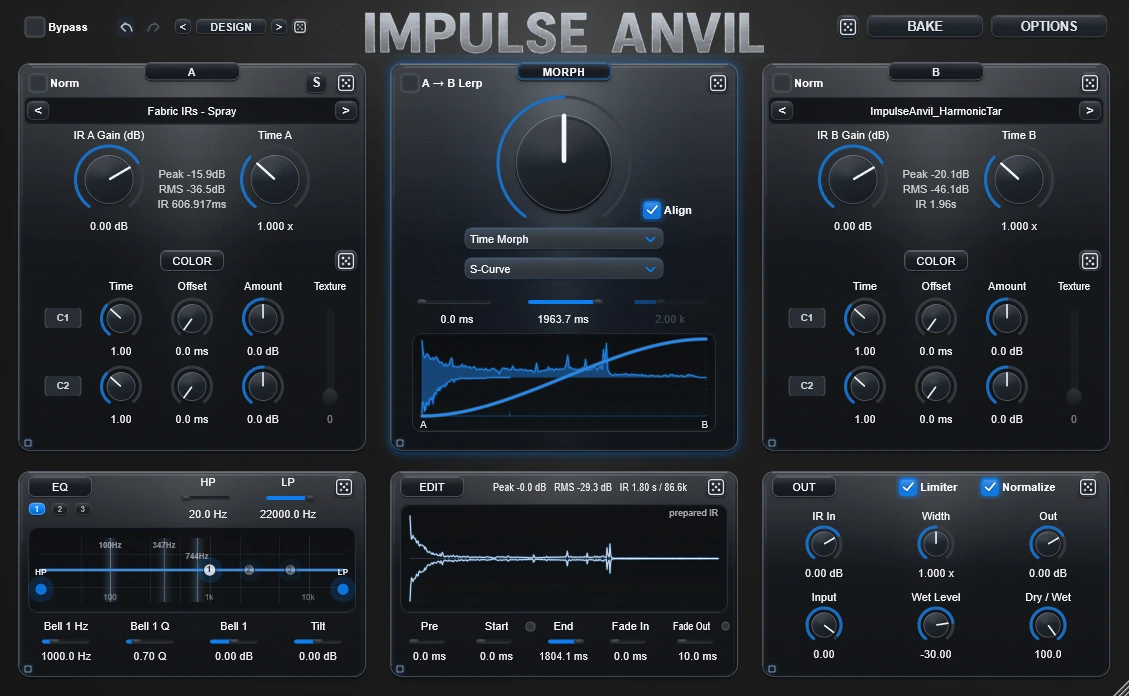
Each slot can be stretched, leveled, colored and textured independently. The active morph mode determines how those prepared states interact before the result reaches editing, EQ, width and output preparation.
Blend A and B in the time domain for direct combinations and dependable starting points.
Fuse spectral character, divide the frequency range between sources, or create alternating spectral relationships.
Move the A/B relationship across left and right, or separate center information from the outside stereo field.
Use the current morph mode to generate a progression from A toward B, then bake that movement into one static WAV impulse response. The motion becomes part of the file rather than live automation.
The layout moves from A/B preparation into Morph, Edit, EQ and Output. You can see where the current sound is being created instead of navigating a stack of disconnected effect pages.
Load factory IRs, user IRs or WAV recordings. Stretch time, set gain and apply Color or Texture Depth independently.
Choose Time Morph, Spectral, Spectral Bandpass, Spectral Zig Zag and spatial modes, or bake an internal A→B progression into one IR.
Trim silence, isolate a useful region, reverse a selected range, add fades and shape the final frequency balance.
Audition the current prepared IR through convolution, then export the designed result as a standard WAV file.
Built-in designs and custom theme files change the presentation without changing the audio workflow. Additional themes, IRs, updates and videos are shared through the Impulse Anvil Discord.

A focused product converts better when its limits are as clear as its strengths. Impulse Anvil is a deliberate IR-building environment, not an automation-first performance effect.
The same VST3 download opens in demo mode. A license key unlocks the full morph engine, both Color rows, A→B Lerp and WAV baking.
Test the plugin in your own DAW before purchasing.
The complete A/B IR-design, morphing and export workflow.
The manual covers installation, activation, Color, Texture Depth, every morph mode, reverse Edit ranges, EQ, preview behavior, baking and practical source ideas.
Both functions are present, but the product is centered on IR design. You prepare A/B sources, morph and sculpt the impulse response, audition it through the internal convolver, and bake the result as WAV.
Yes. Load compatible WAV material or existing impulse responses, then trim, color, texture, morph, EQ and bake the result. Use material you own or are properly allowed to use.
A→B Lerp creates one static IR whose internal tail progresses from A toward B over time. The movement becomes part of the baked WAV itself rather than a live automation gesture.
Yes. Full-version bakes are standard WAV impulse responses and can be loaded into compatible convolution reverbs, IR loaders, cabinet tools and supported hardware.
Impulse Anvil is not designed as an automation-heavy performance effect. Controls that reshape the impulse response rebuild prepared audio in the background and are intended for auditioning, design and baking.
A longer impulse contains more audio data. Trimming the useful range usually speeds up iteration and often produces a tighter, more mixable result.
No. Source length, transients, silence, tonal balance and noise all affect the result. Short, intentional material is usually easier to control; the Edit, fade, EQ and level tools are there to refine experiments before baking.
No. The current Windows release is a manual ZIP bundle containing the complete VST3 folder. The Downloads section includes installation and activation videos.
The current official public release supports Windows 10/11 in 64-bit VST3 hosts. Compatibility still depends on the host correctly supporting the VST3 format.
The full plugin, 126 handmade IRs, the complete morph and Lerp workflow, both Color rows, Texture Depth, editing and WAV baking, with two seats per license.
Start with the free demo. Load your own sounds, explore the included library and hear what Impulse Anvil does inside your own music.