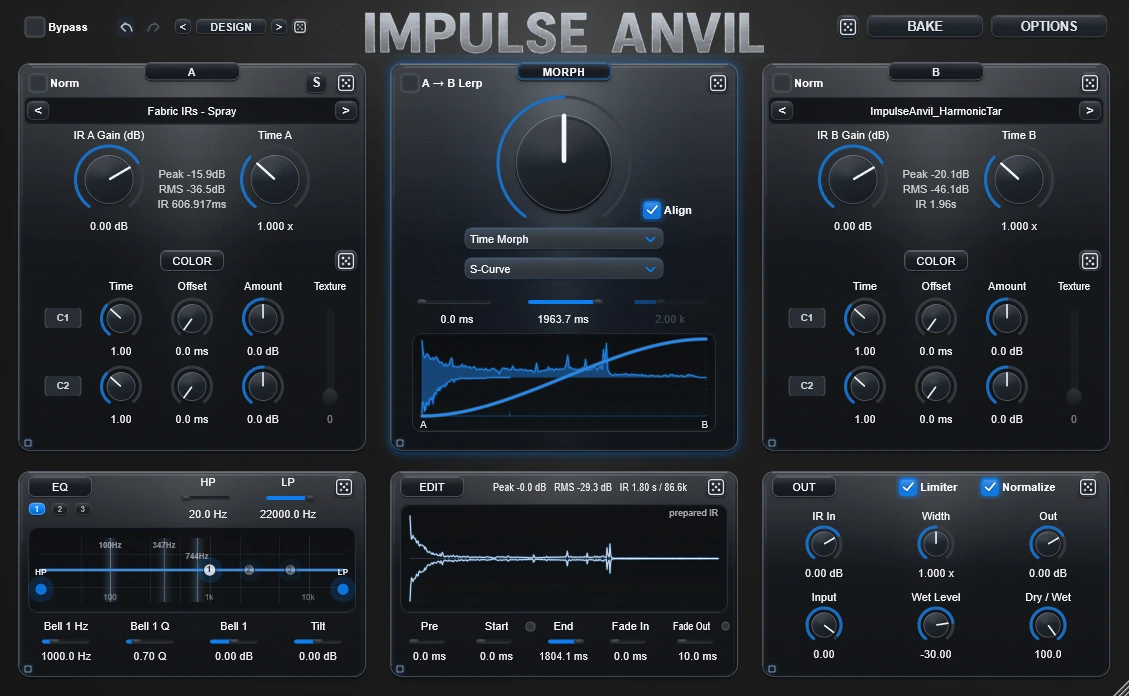
Current documented release: Impulse Anvil 1.0.124. Current builds: Windows VST3 + Standalone; macOS AU, VST3 + Standalone testing builds. This maintenance update focuses on playback stability, more predictable level handling, and smoother editing workflows. Release history stays on the Downloads page.
macOS testing build: Impulse Anvil v1.0.124 is also available as AU and VST3 testing builds with the same demo/full-license functionality. Windows 10/11 VST3 remains the primary supported commercial release. The macOS testing build is not Apple Developer ID signed and is not notarized by Apple; manual Gatekeeper approval may be required. macOS download and setup →
Impulse Anvil 1.0.124Windows VST3
Impulse Anvil
Load an IR into A and reshape it while listening. You can use that response on its own, or prepare B independently and explore Morph and the movement tools.
ANVIL IS THE EFFECT
Impulse Anvil is an impulse-response design workstation and the effect that plays the response on your track. Put it on a playing instrument or audio track, shape the response while you listen, and keep working without exporting anything. Bake only when you want the response itself as a reusable WAV.
1. Your playing track goes through Anvil.Insert Anvil on an instrument or audio track, start playback or loop a section, and keep it running while you tweak.
2. An changes it.The response can add filtering, resonance, space, reflections or stranger transformations.
3. Anvil changes the IR while you listen.A and B are source sounds. Morph defines their relationship. Draw, Path, Glue and Omni can author how that relationship develops while the track keeps playing through it.
4. Keep it your way.Save the whole setup as a preset in OPTIONS when you want to return to it. Bake only when you want the designed response itself as a reusable WAV.
ANVIL IS THE EFFECT: when you reshape the IR, you immediately reshape the transformation being applied to the playing track. You do not need another IR loader.
Playing track → Design response → Hear it in Anvil → Save preset / optional Bake
A and B provide material, Morph defines their relationship, the authoring tools control movement, Edit/EQ/Output refine the result, and Bake can export the response as a WAV.
You should be allowed to understand the idea before you are expected to know the specialist vocabulary. Reference pages stay compact for returning users.
Technical words with a dotted underline can be hovered, focused with the keyboard or clicked to reveal a short explanation. These definitions are optional; they are not prerequisites for continuing.