
Appearance & Designs
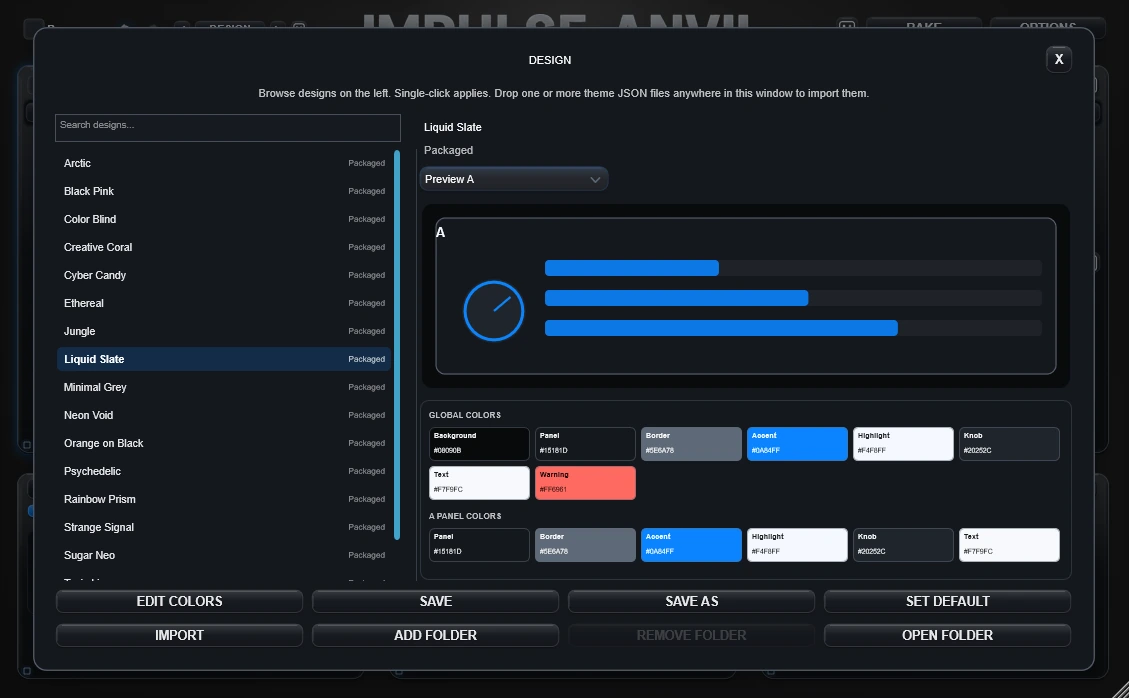
Impulse Anvil's visual system changes the interface, not the audio. Liquid Slate is the current default design.
Persistent DESIGN navigator
The bottom-centre DESIGN navigator shows the current design with previous, next and Random controls. It remains available in Overview and Focus View.
Click the design name to open the DESIGN workspace.
DESIGN workspace
The workspace can browse built-in, packaged, imported and custom-folder designs. It also shows the current palette and provides the existing Schema-2 colour editor.
- Edit Colors
- Save / Save As
- Import
- Add Folder / Remove Folder
- Set Default
Removing a custom design folder removes only the registration from Impulse Anvil. It does not delete the folder or JSON files.
Panel-specific colour ownership
Compatible Schema-2 designs can give A, B, Morph, EQ, Edit and Out their own panel, border, accent, highlight, knob and text colours while still inheriting from the global design when an override is disabled.
Theme JSON
Valid theme JSON files can be imported or dragged onto Impulse Anvil. Packaged designs placed in the release Assets/Themes folder are discovered by the build without requiring new DSP or parameter code.