
Turn a 2-D Gesture into Time with Omni Path
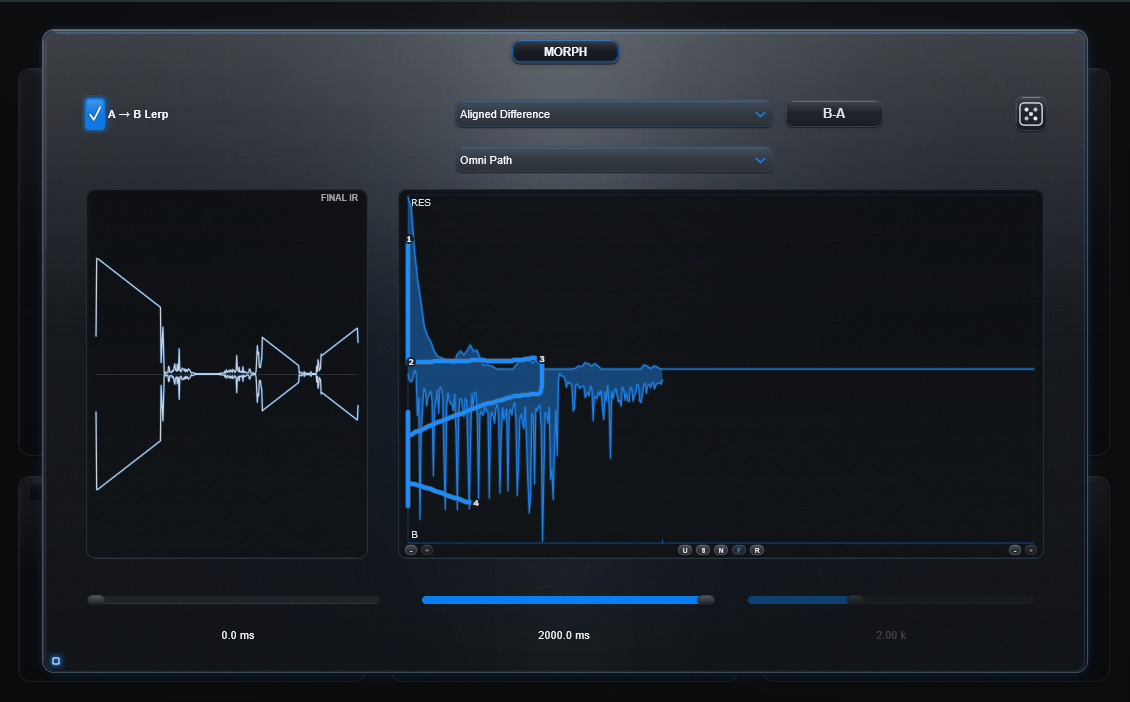
Omni Path makes the gesture itself part of the clock.
Move sideways and you travel through source-time. Move vertically and time still passes. That means you can hold around one moment of the source while the A/B or Morph relationship changes.
Goal
Create an IR whose internal duration follows the distance of a two-dimensional route rather than only its left/right travel.
Know what the axes mean
- X = source-time. Right reads later material; left reads earlier material.
- Y = A/B or current Morph relationship depth.
- Output time = distance travelled through the 2-D route.
Lerp Start and Lerp Time
- Lerp Start offsets the source region the entire painted route reads.
- Lerp Time scales the width of the source-time window the route spans.
- Because output route frames are derived from travelled distance across that span, a larger Lerp Time can also make the same gesture yield a longer output route.
- Glue Path does not use this window. Omni Path does.
Build it
- Load different material into A and B.
- Activate Morph and enable A→B Lerp.
- Choose the Morph relationship you want to explore.
- Set a clear Lerp Start and Lerp Time.
- Choose Omni Path.
- Draw a simple route first, then Preview it.
Try four gestures
1. Horizontal
Draw mostly left-to-right at a steady Y position. This behaves closest to ordinary source traversal because almost all route distance comes from X.
2. Vertical hold
At roughly the middle of the graph, draw almost straight upward or downward. Source-time stays around that X position while A/B or relationship depth changes. Unlike normal Path or Glue's vertical-only behavior, this vertical distance creates real output duration.
3. Diagonal
Move through source-time and depth together. Because both axes contribute to distance, a large diagonal takes longer than a purely horizontal move of the same width.
4. Loop or reverse
Move right, rise, go left, then continue. Reversals revisit earlier source material; vertical and diagonal parts add their own travel.
Path vs Omni Path
Path       = horizontal-distance clock
Omni Path  = 2-D arc-length clock
Both can move backward through source-time. The difference is that ordinary Path only derives elapsed route time from horizontal travel, while Omni also counts vertical movement.
Glue Path vs Omni Path
Glue Path assembles independent strokes as separate pieces and owns its duration independently of Lerp Start/Time.
Omni Path uses free multi-stroke authoring inside the selected Lerp source window, but its clock follows the complete 2-D route.
Technical background
For each route segment, normal Path uses horizontal travel:
distance = abs(dx)Omni Path uses normalized Euclidean 2-D travel:
distance = hypot(dx, dy)The renderer walks that cumulative arc length uniformly. At each output point, X chooses the source index and Y chooses the blend/effect depth. Persisted route geometry, not mouse drawing speed, determines the result.
Preview and Bake
Preview and Bake use the same Omni route semantics. When a gesture produces something useful, Bake commits the prepared construction as a reusable WAV IR.