
IR Browser
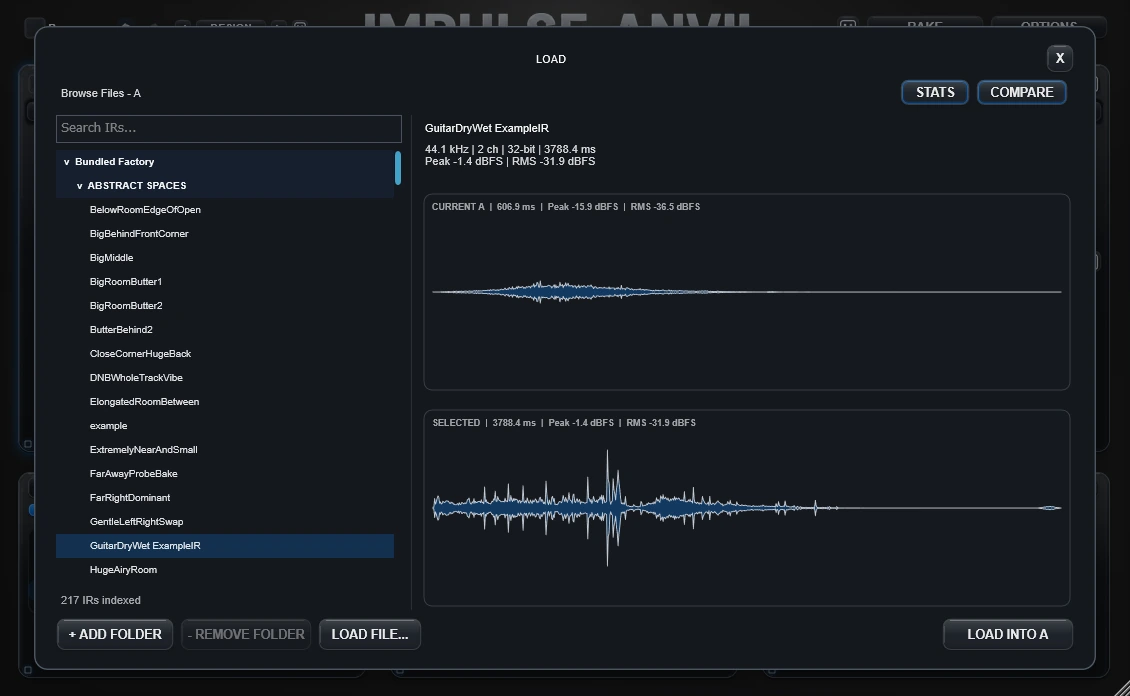
Browse first. Commit only when the candidate is worth loading.
LOAD in A or B opens the same in-plugin browser targeted at that slot.
Inspect a candidate
Single-clicking a file selects it for inspection without immediately replacing the current A/B source. The right side can show its name, technical stats and waveform.
Compare
COMPARE stacks the current slot and selected candidate so both waveforms use the same horizontal time width and raw-amplitude scale. This makes obvious timing and level differences easier to inspect before loading.
Commit the selection
- Press Enter.
- Double-click the candidate.
- Click LOAD INTO A or LOAD INTO B.
- LOAD FILE... can choose an external file and commit it directly.
Search and navigation
Use Search to filter the indexed library. Arrow keys move through candidates. Previous/next controls can step quickly through the known source after the index is ready.
Custom folders
ADD FOLDER registers another machine-local IR location. REMOVE FOLDER removes only that registration from Impulse Anvil; it does not delete or modify the folder or its audio files on disk.
Folder preference
Manual file browsing prefers the last folder you used, then your configured custom folder, then the Factory library, with legacy locations retained as fallback where available. Baked IRs remain outside the plugin bundle in the user Documents area.