
Morph & A→B Lerp
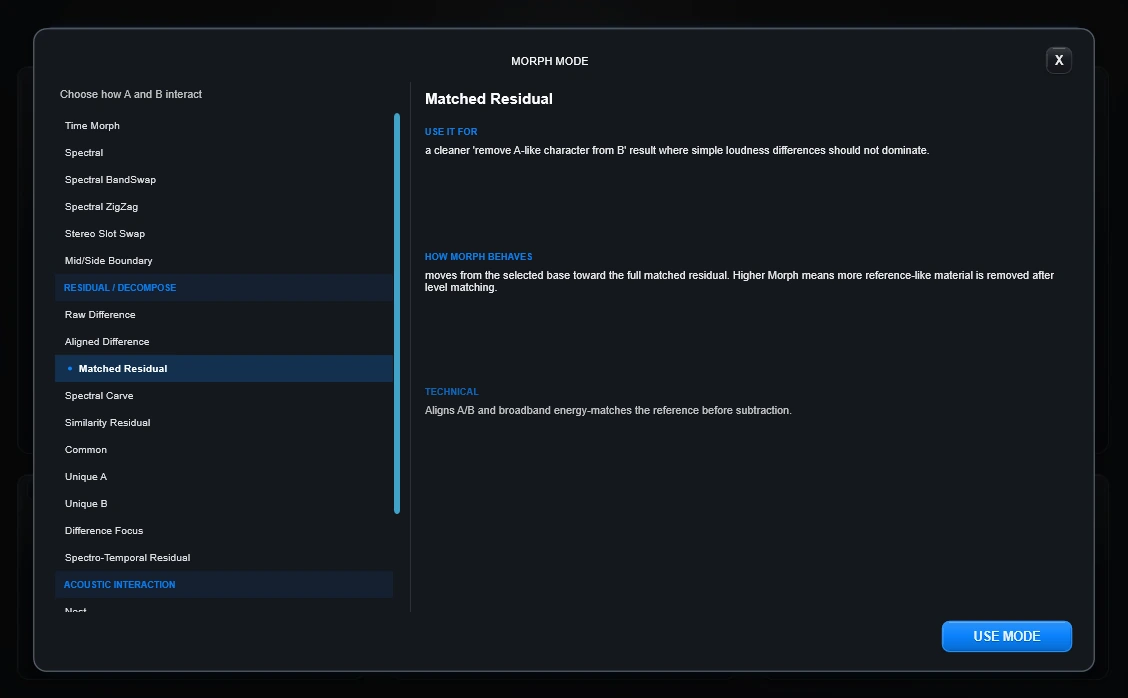
A Morph mode answers one question: what relationship should Anvil create between A and B?
The Morph amount controls how far you move into that relationship. Draw, Path, Glue and Omni can then make the relationship change through the response instead of staying at one fixed amount.
Choose by intention
Core Morph — move or redistribute A and B
Time Morph
Move directly between A and B.
Listen for: the clearest, most literal A-to-B transition. It is the easiest reference point for every other mode.
Try it when: you want to understand two new source responses before getting experimental.
Technical details
Direct sample-by-sample movement between the prepared A and B responses.
Spectral
Move more of the frequency character of A toward B.
Listen for: a tonal change that can feel different from a direct waveform blend.
Try it when: A and B have obviously different dark, bright, resonant or filtered characters.
Technical details
Moves the frequency-magnitude structure of A toward B while maintaining a stable phase relationship.
Spectral BandSwap
Let A control some broad frequency areas and B control others.
Listen for: hybrids where lows, mids and highs can feel as if they come from different sources.
Try it when: you want a more obviously constructed hybrid instead of a smooth blend.
Technical details
Alternates broad bands between A and B and swaps their ownership through Morph.
Spectral ZigZag
Interleave A and B more tightly across frequency.
Listen for: sharper, fractured and more synthetic hybrids.
Try it when: BandSwap is interesting but still feels too broad or orderly.
Technical details
Uses denser alternating spectral stripes for a more finely interleaved frequency relationship.
Stereo Slot Swap
Make the left and right sides travel through A and B in opposite directions.
Listen for: asymmetrical width and stereo movement.
Try it when: the two responses have interesting stereo differences.
Technical details
Sends the A/B relationship in opposite directions across left and right channels.
Mid/Side Boundary
Keep more of A in the center while B increasingly defines the sides.
Listen for: a stable middle with a different texture or space around it.
Try it when: you want width without making the center disappear.
Technical details
Uses structure so A remains more of the center/mid anchor while B increasingly defines the outside/side field.
Residual / Decompose — ask what they share and what separates them
A is simply what remains after some estimated part has been removed. These modes are most useful when you stop thinking “blend A and B” and start thinking “what is actually different here?”
Raw Difference
Subtract one response from the other exactly as they are.
Listen for: remaining differences, plus potentially strong combing or ringing when timing/level do not match.
Try it when: you want the most literal and potentially unruly version of “what is different?”
Technical details
Literal directional subtraction. Timing and level mismatches remain part of the result.
Aligned Difference
Line up the main events first, then subtract.
Listen for: less of the difference caused only by arrival timing and more of what remains afterward.
Try it when: A and B are related captures whose important hit/event does not start at exactly the same point.
Technical details
Aligns the dominant events of A and B before directional subtraction.
Matched Residual
Line them up, bring their overall levels closer, then hear what remains.
Listen for: differences that are less dominated by simple timing and broadband loudness mismatch.
Try it when: you are comparing related responses recorded at slightly different levels.
Technical details
Aligns and broadband level-matches the responses before subtraction.
Spectral Carve
Carve the reference away by different amounts at different frequencies.
Listen for: differences that appear in specific low, mid or high regions instead of one uniform subtraction.
Try it when: two responses feel similar overall but clearly differ in particular frequency areas.
Technical details
Uses bounded frequency-dependent subtraction instead of removing the same amount everywhere.
Similarity Residual
Remove more where A and B already appear similar.
Listen for: contrasting material becoming more exposed as shared-looking regions are reduced.
Try it when: the sources are related enough that a plain subtraction feels too crude.
Technical details
Removes the reference more strongly where A and B appear genuinely similar.
Common
Keep more of what A and B appear to share.
Listen for: a response that can feel like a shared core with some unique material reduced.
Try it when: A and B are related rooms, resonances, captures or variations of similar material.
Technical details
Estimates the response component shared by A and B.
Unique A
Keep more of what makes A different from B.
Listen for: A's contrasting material after estimated shared content is reduced.
Try it when: A and B are similar and you want to explore what separates A from B.
Technical details
Keeps what remains characteristic of A after estimated shared material is removed.
Unique B
Keep more of what makes B different from A.
Listen for: B's contrasting material after estimated shared content is reduced.
Try it when: B contains a resonance, space or texture you want to examine without simply crossfading all of B over A.
Technical details
Keeps what remains characteristic of B after estimated shared material is removed.
Difference Focus
Turn the disagreement up and the agreement down.
Listen for: the regions where A and B contrast most strongly becoming more obvious.
Try it when: you want a more exaggerated difference rather than a literal residual.
Technical details
Emphasizes regions where the two responses disagree most strongly.
Spectro-Temporal Residual
Find differences that change across both time and frequency.
Listen for: local fragments and textures that can appear only at particular moments or frequency regions.
Try it when: the interesting difference is not constant through the whole response.
Technical details
Varies similarity and subtraction locally across both time and frequency.
Acoustic Interaction — make the responses operate on each other
Nest
Pass one acoustic response through the other.
Listen for: a combined response that behaves more like stacked acoustic systems than a crossfade.
Try it when: the idea of “cabinet through room” or “resonant object through space” is more interesting than blending.
Technical details
Cascades A and B as acoustic transfer functions, effectively placing one response through the other.
Transfer
Estimate the filter-like transformation that moves one response toward the other.
Listen for: the relationship between the sources becoming the material, rather than either source by itself.
Try it when: A and B are related enough that “what changes A into B?” is an interesting question.
Technical details
Builds a stabilized A→B or B→A transfer operator. This is an estimated DSP relationship, not semantic recognition of the physical source.
Ghost
Use the tonal shape of one response with the phase structure of the other.
Listen for: a familiar frequency body behaving with a different internal timing/phase character.
Try it when: A and B have very different tonal and temporal personalities.
Technical details
Combines the magnitude structure of one response with the structure of the other.
Eclipse
Push A and B toward deep cancellation, then keep what survives.
Listen for: hollow, carved, sparse or unstable responses.
Try it when: A and B are related and you want something more extreme than an ordinary difference mode.
Technical details
Searches for a stable deep-cancellation relationship and keeps the surviving residual.
Spectral Time Shear
Let lows, mids and highs follow different A/B journeys through time.
Listen for: a response whose frequency regions seem to evolve on different timelines.
Try it when: you want motion that is more complex than the whole spectrum moving together.
Technical details
Creates a time-frequency hybrid where low, mid and high regions follow different A/B trajectories.
Direction matters in some modes
Some Residual and Acoustic Interaction modes expose a small direction control because “A relative to B” is not the same question as “B relative to A.” Unique A and Unique B already state their direction in the name.
Choose the relationship, then author its behavior
A fixed Morph amount chooses one position in the selected relationship. Built-in curves, Draw, Path, Glue and Omni can turn that amount into movement through the response.
- Draw: paint how relationship depth changes.
- Path: also route which point in is read, including backward travel.
- Glue Path: assemble separate painted pieces into a new sequence; Glue owns its constructed duration independently of Lerp Start/Time.
- Omni Path: keep X as source-time and Y as relationship depth while both horizontal and vertical route travel create output time inside the selected Lerp source window.
Learn Draw, Path, Glue and Omni →
A→B Lerp
A→B Lerp builds one static IR whose internal relationship changes over time. It is not a DAW automation recording. The selected Morph mode and authored curve/path become part of the prepared response, and Bake can commit that construction to WAV.
Technical background
The longer prepared A/B endpoint defines the main Lerp source domain. Absolute Lerp Start and Time are clamped to the available endpoint duration. Time Morph can run as a continuous time-varying blend; spectral/spatial relationships use mode-aware rendering so Preview and Bake share the same prepared result.
Try it instead of memorizing it
You do not need to learn 21 definitions before using Morph. Load two contrasting responses, start with Time Morph, switch one mode at a time and listen to what question each mode asks differently.