
IR A / IR B
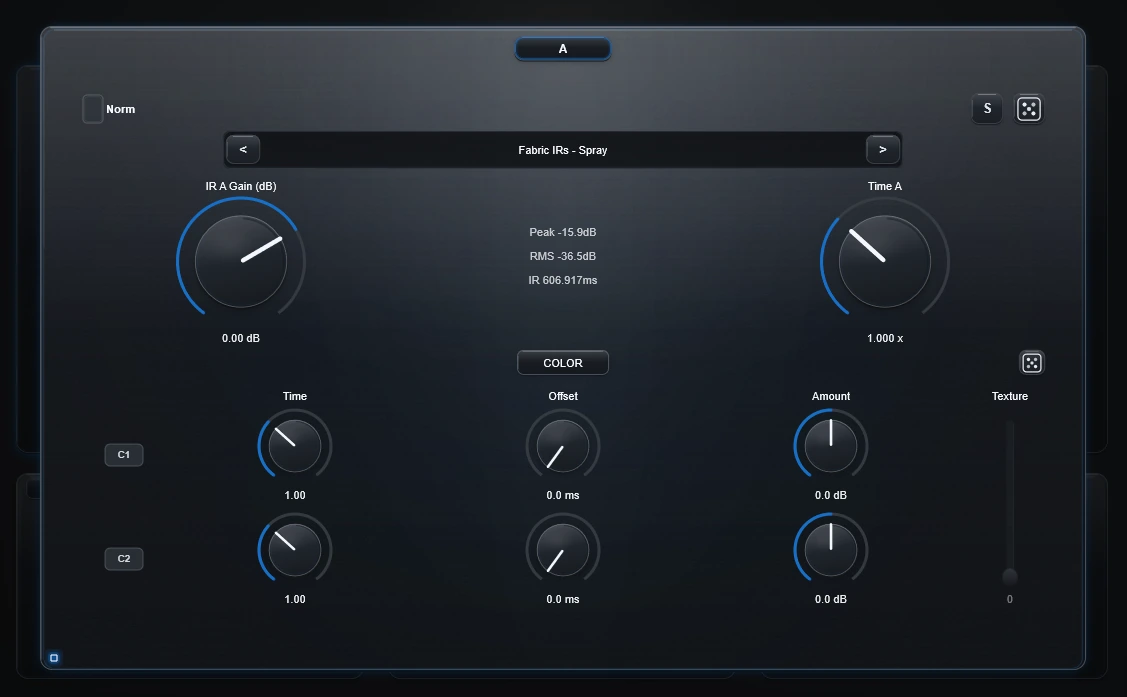
A and B are two independent source lanes. They can hold measured IRs, designed IRs or compatible recordings.
Choose what you are listening to
The current interface uses the panels themselves as navigation:
- click A to hear A;
- click B to hear B;
- click Morph to hear A and B through the current Morph setup.
There is no separate user-facing "A Only" / "B Only" workflow to learn.
Load a source
Use Load or drag a WAV/AIFF/FLAC file directly onto the A or B panel. The whole card accepts drops.
Use the previous/next arrows to step through discovered IR files.
Time A / Time B
Changes the duration of that source before Color, Texture and Morph.
- Below 1.0 = shorter/faster.
- 1.0 = original duration.
- Above 1.0 = longer/slower.
Normalize A / Normalize B
A and B have independent Normalize switches.
Turn Normalize on when one source is much quieter or louder than the other and you want a more even starting point before Morph.
Gain
Gain still works even with Normalize enabled. Normalize creates the reference level first; Gain lets you intentionally make A or B more dominant afterwards.
Random discovery
Random beside Load
Chooses another available IR and randomizes the slot's Time, Color and Texture.
It does not randomly boost Gain: Gain returns to 0 dB. Your Normalize switch stays as you set it.
Random beside Color
Keeps the current file but randomizes its Time, Color and Texture settings. Use it when you like the source itself but want a new treatment.
Reset the slot's creative layer
Double-click the Color header in A or B to reset that slot's Color and Texture controls without replacing the loaded source.
Technical background
The slot processing order is Time → Color/Texture → per-slot Normalize → Gain. During two-slot processing, sample-rate differences are resolved as required before A/B construction.